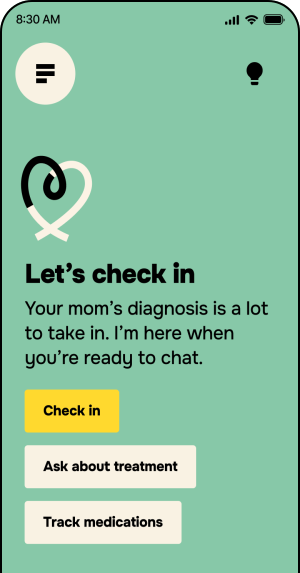
Welcome to Compass, your digital health navigator

You’re one of the first to try it. Help shape what it becomes.

What Nuna does

Understand your whole family’s health, and keep others in the loop.

Everything in

one place

Visits, lab results and medications come together in one app, so you don’t have to log into a different portal for everyone you care for.

Answers in

plain language

Ask Nuna about your health by voice or text, mention things you want to track, and walk into your next appointment ready.

Stay connected

& informed

Nuna Circle lets you share health information with family or close friends, everyone stays in the loop without repeating yourself.

How to get started

Watch your inbox

You’ll get an email from the Nuna team with instructions to get started. Sometimes, it can land in spam, so check there too.

Download the app on your phone, and sign up

Once the app is installed, you’ll be able to create an account.

Take Nuna for a spin

Explore the app

Connect your health records

Ask Nuna a question out loud

Invite someone to your Nuna Circle

Tell us how it’s going

Tap the feedback button in the app to send a note whenever something feels great, confusing or broken. Every message goes straight to the Nuna team.

Questions - Nuna Beta FAQ

Questions

Frequently asked questions about the Nuna beta

On iPhone

  1. Download TestFlight from the App Store (Nuna uses TestFlight to launch apps before they're publicly available)
  2. Open the TestFlight app, and accept the terms if prompted.
  3. Sign in with your Apple ID (your email and Apple ID password) if prompted.
  4. If you don’t see the Nuna Compass app appear in TestFlight, look for an email from TestFlight with your invitation.
  5. Once the Nuna Compass logo appears in the TestFlight app, tap the button next to Nuna Compass that says Install.
  6. Tap Open to get started on the Nuna Compass app.

After successfully installation, the Nuna Compass app will appear on one of your home screens, like any other app.

On Android

  1. Open the Google Play Store and make sure you're signed in with the email you put in the Compass enrollment form.
  2. Tap this link on your phone: https://play.google.com/store/apps/details?id=com.nuna.compass
  3. Tap Become a tester, then Download it on Google Play.
  4. Tap Install. If Nuna Compass doesn't show up right away, give it a few minutes and try again.

Check your spam folder for a message from the Nuna team. If it's not there, email us at compass-trusted-testers@nuna.com from the address you signed up with.

Tap the feedback button in the app anytime. You can also email us at compass-trusted-testers@nuna.com.

No, it's free.

We'll email you before it ends to let you know what's next.

Spots are limited right now. Send us their name and email, and we'll reach out when we have room.

Email us and we'll remove your access. You can delete the app at any time.

Email compass-trusted-testers@nuna.com and someone on the Nuna team will get back to you.